Account access and account frame
There are two ways to show merchants their accounts: read data through the API and build your own view, or embed a ready-made dpay account frame with no UI development. Both require the account:read scope and merchant delegation, which is created when the agreement is signed. See the consent mechanism.
Identify the merchant by the merchant's reference (ref) in the path; no separate header is required. Lists use cursor pagination. Continue using the returned cursor until no cursor remains.
Access through the API
Merchant list
Returns the merchants in your channel. Use it as a starting point when synchronising the state of your customer portfolio.
GET/api/partner/v1/merchantsList the merchants in your channel (cursor pagination).Full contract in the API Reference
Merchant details and balance
Returns the merchant's available balance in PLN, broken down by product. Always use this endpoint as the source of the balance; see the note below.
GET/api/partner/v1/merchants/{ref}Merchant details and available balance.Full contract in the API Reference
Transactions
GET/api/partner/v1/merchants/{ref}/transactionsMerchant transactions (cursor pagination).Full contract in the API Reference
The status field is the numeric dpay transaction status, identical to the value received in payment.* webhooks. See transaction statuses for their meaning. Correlate transactions with your objects using payment_id, which is returned during payment registration. The list does not contain your own identifiers.
Settlements
Returns amounts paid to the merchant's bank account together with their status.
GET/api/partner/v1/merchants/{ref}/settlementsSettlements paid to the merchant's bank account.Full contract in the API Reference
To see what a single settlement consists of, fetch its details - you get the header, totals for the whole settlement, and the transactions it covers.
GET/api/partner/v1/merchants/{ref}/settlements/{id}A settlement together with the transactions it covers.Full contract in the API Reference
This endpoint paginates by page number (page, per_page), unlike the settlements list, which is cursor-based. The summary totals always describe the whole settlement, so you can reconcile the transfer amount without fetching every page. All amounts are decimal strings with two decimal places.
Do not calculate the balance on the client side by summing transactions. The API balance accounts for refunds, fees, and reserved payouts. Always use the balance value from dpay.
Embeddable account frame
Instead of building your own view, you can embed a ready-made, branded dpay account frame. The merchant can view the balance and transactions, opt in to payouts using an SMS code, and revoke your application's access, all inside your product without signing in to dpay.
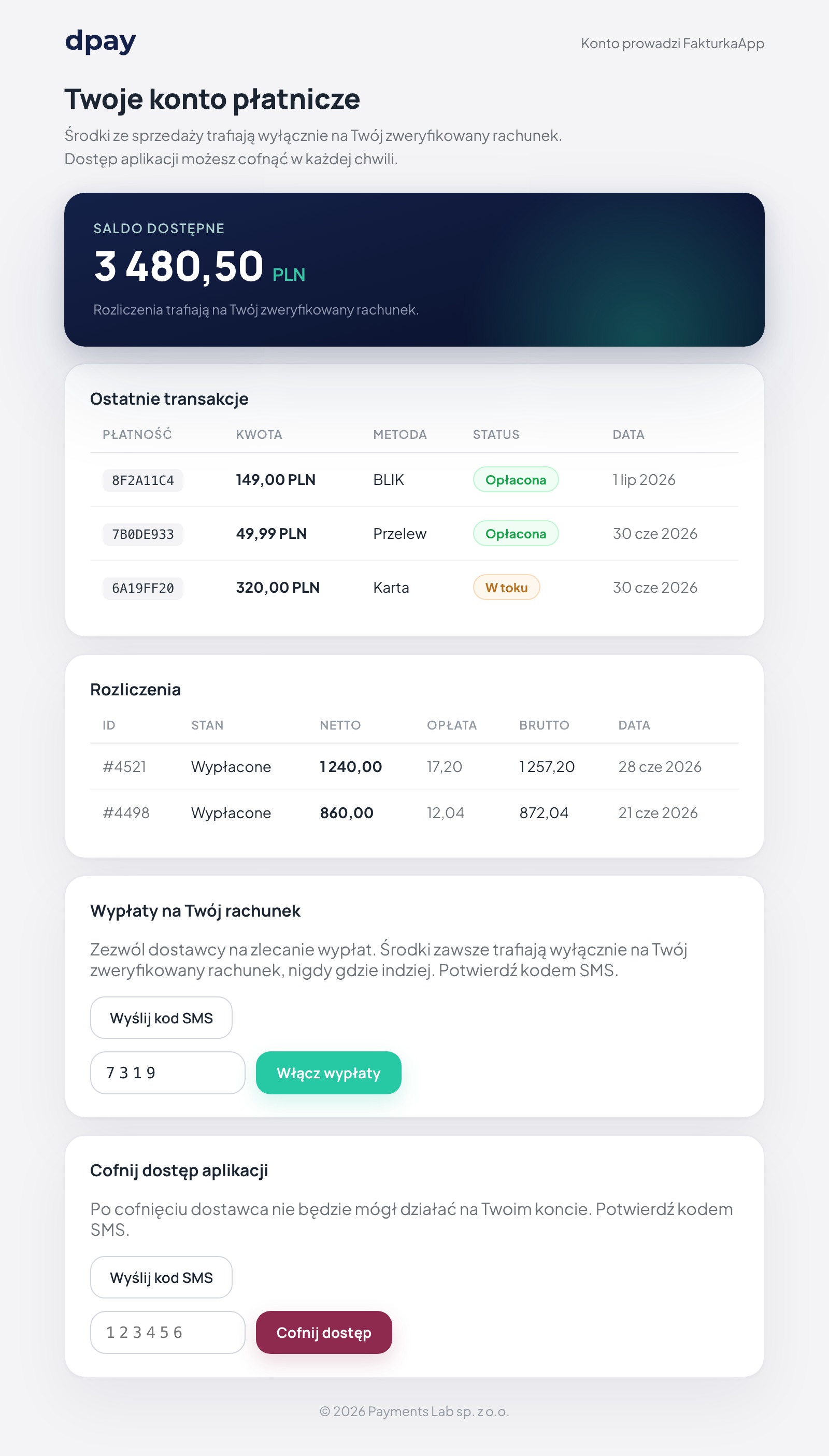
How to embed it
The frame uses a short-lived token, so the merchant does not need to sign in to dpay. Mint the frame URL on your server (account:read scope + delegation), then pass the token to the SDK.
Step 1 - mint the frame URL (server):
GET/api/partner/v1/merchants/{ref}/account-frameMint a short-lived URL for the embeddable account frame.Full contract in the API Reference
Step 2 - mount the frame (browser):
The token is the final segment of the embed_url path:
<div id="dpay-account"></div>

<script src="https://panel.dpay.pl/sdk/dpay-onboarding-sdk.js"></script>
<script>
  DpayOnboarding.mountAccount('#dpay-account', {
    token: '<token from embed_url>',
    locale: 'en',
    onEvent: (e) => {
      if (e.type === 'revoked') {
        // The merchant revoked access - update your UI
      }
    },
  });
</script>
Frame token rules
- Lifetime: 15 minutes (
expires_atin the mint response). The token is short-lived, so generate it immediately before embedding the frame when the merchant opens the account page. - Mint it on the server. Never expose the
dpk_...key in the browser. Retrieve the frame URL on your backend and pass only its token to the frontend. - Use one token per frame session. Mint a new token after expiry.
Only the short-lived frame token is sent to the browser, never your dpk_... key. The partner key provides access to all your merchants and must remain on the server.
Frame events
The frame emits events through postMessage, like the onboarding widget. The callback receives { type, payload }:
| Event | When |
|---|---|
ready | The frame has loaded. |
resize | The content height has changed (the SDK adjusts the iframe). |
cookies_blocked | The browser blocks cookies, so the SDK renders a "continue in a new window" fallback. |
error | The iframe failed to load (reason: load_timeout / iframe_error). |
revoked | The merchant revoked your application's access across all permissions. Stop performing on-behalf actions and update your application state. |